Posts

Solve the Flutter Outline shows "Nothing to show" in Android Studio

Image
  Solution: Click on the red recycle icon of the Dart Analysis windows Have you wondered why the Flutter Outline doesn't show anything? I googled it and found many answers. Strangely the accepted answer on stackoverflow.com, which has got 144 helpful votes, doesn't actually solve the issue, especially in my case. Therefore I wrote about it here to help other people. As you can see in that link above, there are 9 answers to that particular questions. In my case, only two actually work i.e. clicking on red recycle icon in the Dart Analysis window.  Here we are folks. As a programmer you wasted a lot of time googling and try any solution written, which most of the time don't work. Only after trying many things you may hit the correct one! Cheers!
Solve flutter doctor android licenses error

Image
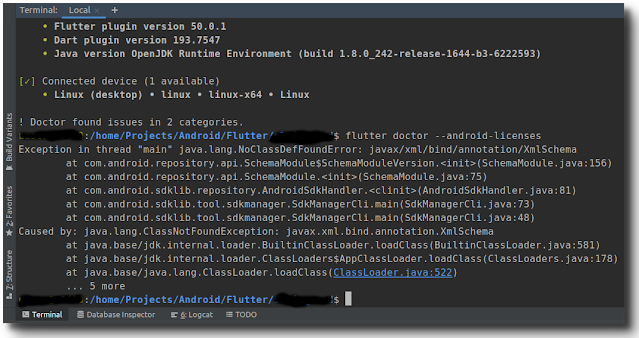
error: flutter doctor --android-licenses Life as a programmer seems sometimes like a pain (luckily a true programmer loves such a life :). You could spend hours only to fix a small error. That happened to me recently. Suddenly flutter doctor threw error of android licenses (see the screenshot above). I spent hours browsing for solution on the web (esp. stockoverflow.com). Unfortunately some accepted solutions there didn't really solve the problem I had. Therefore I feel the need to document it here to help other users who happen to face the same issues. In short: simple "export JAVA_OPTS='-XX:+IgnoreUnrecognizedVMOptions --add-modules java.se.ee'" as some have suggested doesn't work! These are the steps that solve the issue (not inside the Android Studio terminal, because Android studio has its own jdk version): 1. Install openjdk8: sudo apt install openjdk-8-jdk 2. Select java8 as default: sudo update-alternatives --config java and select jdk8. 3. make sure ...

For the first time I pre-ordered a phone without reading any review. Why?

Image
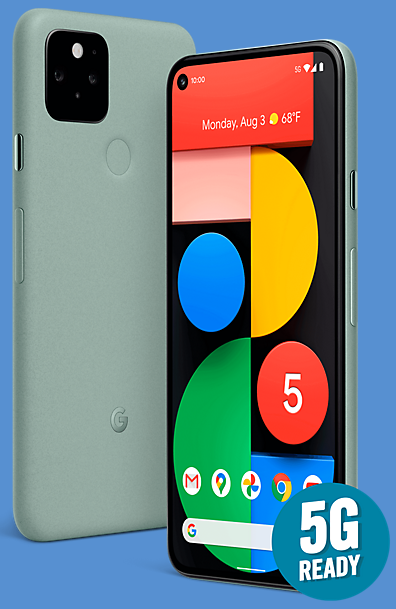
  I have done what I normally not do: pre-ordered Google Pixel 5, without reading a review. Why? Google is to blame. For years I had always chased the flagship phones, like Samsung Galaxy S or Galaxy Note series and later on OnePlus devices. I regularly changed phone after 8-10 months! One thing that wasted a lot of time was customising, because there was always something I didn't like and even bothered me. Until Google Pixel 2 entered the scene in October 2017! That phone spoilt me, the only thing I had to change was the wallpaper. Apart from that everything works smoothly and a lot of my friends asked me with which camera I took my photos. And it's still my primary device until now. By the end of last year I thought Pixel 2 needed an upgrade, not because it was not working well, but I just wanted to try a new flagship. At the time OnePlus 7T (OP7T) was claimed the best smartphone on various websites. The long-term review of gsmarena.com and of MKBHD influenced my decision.  ...

Got an invaluable treasure

Image
While browsing for a Nias dictionary, I stumbled upon the abebooks website. And indeed it listed the old dictionary I was looking for for puchase. And so I did just that. After the completed transaction I found out, that the seller is in Delhi, India, and it took 25 days for delivery. Hmmm.... Apart from the worst customer service I have ever had (and will make sure I will not purchase anything from them anymore, since they don't deserve my money with such terrible customer service) the dictionary arrived. To my surprise it is not the original print, but a newly printed version of the old book. As you can see at the left page of the photo above, the company is specialised in printing old books. I suppose this is legal, as the author and the print was over 100 years ago, so it should be now on public domain. Despite the turn and twist to Delhi, I have to admit that this is really an extraordinary treasure for Nias language. As far as I am aware of, this is the first proper dictionar...

New big projects ahead: Nias language projects

Image
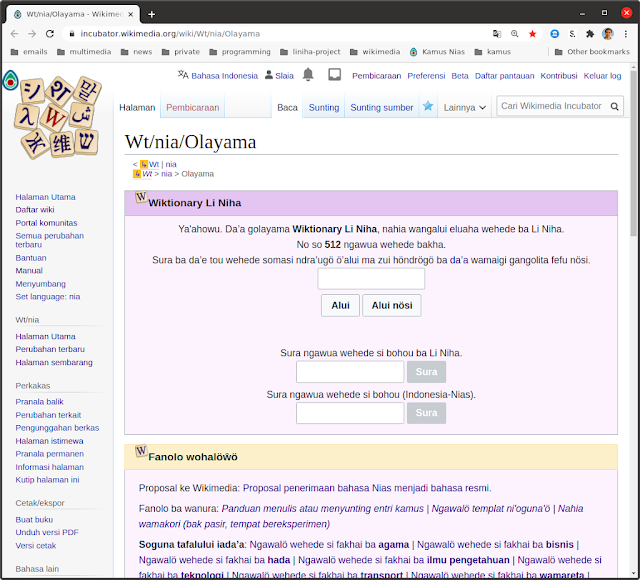
In the past three months a lot of things happened, but there will be a lot in the future. Last year I started the Nias Keyboard Project , a project to provide Nias typical characters, that are not available on normal keyboard (smartphones and PCs). That's done and the app has been available on Google Play for a few months. That led me to create a dictionary and a language extension for AnySoftKeyboard, the truly open-source Android keyboard project. While I was trying to figure out how to write a hunspell affix file for Nias language (would be needed for the automatic spelling check on the PC), I realised another step is needed: to set the standard of the language itself (or at least a reference I can work on).  And that led me to form a group of enthusiasts to discuss various topics on Nias language. The WA group finally agreed on a five year plan (2020-2025) to document, to set standards and to promote Nias language. In June I realised that it was a huge task to compile new wor...

How to solve the reversed Fn key on Logitech K380

Image
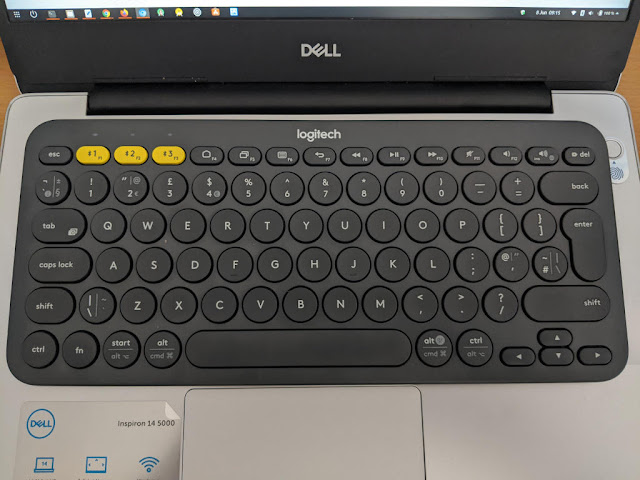
Logitech K380 on top of my laptop's keyboard After wasting a lot of money buying some bluetooth keyboards from different brands I finally purchased Logitech K380 .  In short: this is the best of all of them by miles. Not only the tactile feel is superb, the connection is realible too. And when my laptop starts it takes only a few seconds to register the key press on the login screen, something that I can't say of all other compact keyboards I have had. But there are two things that annoy me . First the over-crowded layout of the UK version I have got (see the picture above for the most top left key, number 2 key, the two keys on the left side of the enter key and the bottom left key next to Shift key, that makes Shift keys much small than on the US version. I would have preferred to buy the US version , but it is impossible to find in the UK where I live. Second the reversed Fn key setup . I understand that Logitech mainly target multimedia use with this keyboard. But I would...

Windows Updates Screwed Up My Laptop. So Bye, Bye Windows!

Image
Windows is not activated, my goodness! Windows 10 Professional was pre-installed on my Dell Inspiron 5480 when I bought it. I kept it there and kept it updated just in case I need to use any Windows application one day. Until yesterday when as usual Windows suggested another updates. I can't remember all of them but they were Windows 10 version 1909 , Intel related stuff and others . As usual I just let them all run. However this time it went really really wrong. First after a few times restarts I noticed a defaced desktop : the usual wallpaper was set to the default one and the theme was also different because the icons looked different. And second , to my horror, I saw in the Settings that Windows is now not activated !!! What the hell had happened! I shut down the system just to make sure this was only temporary. The laptop rebooted, but I noticed the grub menu for dual boot had disappeared . It booted directly into Windows. And the defaced desktop and the deactivated Wind...