Posts

Fix the Gnome Boxes issue when importing a vm created in Quickemu

Image
Quickemu Project on GitHub For two years now I have been using Quickemu for all my vm need (Good bye Virtualbox). I could go down the path of Virt Manager, but the simplicity of Quickemu has attracted me more. However Quickemu is not the only contender in this regard. The Gnome Boxes proves to be an alternative as well. In particular I would need the Gnome Boxes to boot the vm with a two disks. The only issue is Quickemu created a vm with UEFI, while Gnome Boxes pre-selects BIOS during vm creation. Therefore the vm would not boot. Creating a vm in Gnome Boxes So please make sure to select UEFI (see the picture) when importing existing vm created by Quickemu.

Add a second disk to Gnome Boxes

Image
Gnome Boxes icon If you are like me, who wonders how to add a second disk to a gnome boxes vm, but doesn't knows a lot about qemu-kvm xml configuration, then the following tips is for you too. There is no way to do this in the Gnome Boxes preferences. The only way is to edit the configuration file. To open the configuration file right click on the vm and then on Preferences . Click on the Edit Configuration at the bottom. You'll see the configuration in xml format in the text editor that has opened up. Now add the entry for the second disk. The whole entries for all disks can look like this:     <disk type='file' device='disk'>       <driver name='qemu' type='qcow2' cache='writeback' discard='unmap'/>       <source file='/home/user/.local/share/gnome-boxes/images/main-disk.qcow2'/>       <target dev='vda' bus='virtio'/>       <address type='pci' domain='0x0000' b...

Tips: Modify Logitech K380 Layout on Ubuntu Linux

Image
  I love the Logitech K380 keyboard. In my case I'm using the UK layout version. But it annoys me that some the keys do not exactly represent the letters on it. For example the keys with the grey letters. In the past I got over it and trained my muscle memory to hit a key when I mean to type a certain letter. However I found out that it's very simple to adapt the layout in Linux (I'm using Ubuntu 23.10 at the moment). Not only that you can exchange the keys for something else, for example for a letter or symbols that you frequently use. In my case I need to type the letters ŵ and ö a lot in my work. So I added the functionality that AltGr+w and AltGr+o produce the letter ŵ and ö respectively. How to do that? Easier than you think. Here is how to do it. We need to modify 5 files. First the layout file inside the  /usr/share/X11/xkb/symbols directory and the other 4 are inside the  /usr/share/X11/xkb/rules  directory. As I am using a UK keyboard, the layout file I nee...

Nias Wiki app dead. Long live Wiki Nias app!

Hmmm... what's going on? This is now the third app I have been unpublished on the Google Play Store. Remember I wrote in the previous post that I needed to hand over the maintainance Nias language pack app to ASK developer? Yes that created security issue with my Play Console account. My bad I used to use the same Play Store key and password for all my apps. Therefore I unpublished Nias Wiki app and created a new one under the name Wiki Nias. Hey I have learned my lesson. Each app will have now its unique key and password! So in case I have to hand it over to other developer in the future, it will not create headache to me. Cheers!

Indo-Nias Keyboard has been unpublished

Image
Nias Keyboard Layout This is the second app on Google Play Store I unpublished today. The reason for this one is simply complicated. First I used to publish the Nias language pack for AnySoftKeyboard on my private account. There are two packs: first Nias language pack and Indo-Nias language pack. However in the past year I notice that I don't have additional resources to maintain it. So I decided to unpublished the Indo-Nias language pack, while handing over the maintainance of the Nias language pack to ASK main developer. A bit sad, because my name as sole contributor for Nias language pack will be not visible in the git main merge. But at least it doesn't take my resources and if another developer wants to work on it, they can do it in the main ASK git tree. In short: the Nias language pack is still available on the Google Play Store, and on ASK github repository, but the Indo-Nias language pack is gone. Sorry for those who are still using it. BTW: all Nias keyboard related p...

GuNews app has been unpublished

Image
GuNews app icon As a single developer I don't have enough resources to deal with so many new requirements for a news app. Quite sad, because that's the only app I wrote in Java, before moving to Dart/Flutter. And some of my friends still enjoy using it. However the constant changed policies on Google Play Store require additional time and resources. Therefore I decided to unpublish the app. Of course those who had installed in on their devices can continue to use it, but new users will not be able to find it. Cheers :(

Two basic tips I wish they were built-in on Ubuntu

Image
I use Ubuntu daily for work. And I copy and paste a lot. It annoys me that there is no easy way to provide this basic functionality built-in on Ubuntu. In the past it used to be very easy, you select a block of texts with a mouse, move to other place and insert the text there with a simple middle mouse click. Therefore I was glad to find these tips and another tips on keyboard remapping and want to keep them here. 1. Mouse button Copy and Paste from Earl C. Ruby III at earlruby.org 2.  Remap Keyboard And Mouse Buttons On Linux With The New Input Remapper GUI (Supports X11 And Wayland) from Logix at linuxuprising.com Cheers!

Introducing programming to Nias young generation

Image
Coding   In the second half of 2021 I was mainly busy doing programming introduction to a few young people from Nias. There were two sessions per week. One session for Introduction to Python and the other one for Introduction to Flutter (apps development). Naturally all courses were held online per zoom, which has its own challenges. First we wasted a lot of times to help each participants navigating their codes. In a classroom this would be easier and quicker to do. Second, making presentation online requires its own skills. Third, the internet connection of each participants were not great. However I was very pleased with the idea. I have always dreamt to help young people from Nias to advance in their education. These programming courses were only a taste of it. The dream is still alive and I really hope one day this dream comes true. The courses ended by Christmas. At least the participants have got a taste in programming. Hope they could build their own journey or inspire othe...

My issue with Ubuntu Dock, Panel and Vertical Workspaces

Image
  Image by Karolina Grabowska from Pixabay Am I the only one who is always annoyed by the presence of dock and panel on Ubuntu? I know Ubuntu got the inspiration from Mac for this, but I simply want to have my screen free of panel and dock. Even on a big monitor, I simply want them to hide in the background. The same with vertical workspace. Am I the only one who feels it unnatural to switch workspace vertically? And there is no switch for this in Ubuntu Settings. I hope Ubuntu allow simpler switch for these in future versions of Ubuntu. It's a hassle to install the gnome extensions.  BTW I installed Dash to Panel extension by charlesg99 to solve the first issue and Horizontal workspaces by fmuellner for the second. My setup is now, to have only one panel on the bottom, that hides normally. I only show it when I need it (with Super+i shortcut). 

How to avoid opening kotlin/java files automatically in Flutter

Image
  Starting wizard from Android Studio's landing page In one of my "Learn Flutter together" sessions, one participant encountered an annoying issue. Instead of opening main.dart file, Android Studio always opens the MainActivity.java or MainActivity.kt. I didn't know how to solve that issue. Until I got an idea today. Today I happened to run the wizard from the landing page of Android Studio (AS) (see the picture above), not from inside an opened Flutter project through File, New, New Flutter project. It seems that starting the wizard from AS landing page, will show the page where various languages/frameworks can be selected (see the picture below). When starting a new Flutter project, a beginner could have accidentally clicked on Android or Java instead. That creates the issue with the Flutter project. At least this, I believe, was the cause. Therefore please make sure to select Flutter (see no 1 in the picture above) before continuing to the next page!  BTW please a...

Bye, bye iPad

 Yesterday I finally sold my iPad Mini 5 through uk.webuy.com. It seems that my friendship with Apple products cannot go far. I lost my last iPhone in 2012 and the last iPad in 2021. Why? User experience! First, it really annoyed me that quite often the fingerprint reader didn't always work. First I thought it had to do with iPad Mini 4, so I sold that one and bought iPad Mini 5. However it is the same story. It was frustrating, because I have never had issue with the fingerprint scanner of my Pixel 5 and Pixel 2 before that. Second, selecting text in a browser on iPad is often a mishit. The same with reading the magazines. Clicking and swyping on certain space in order to scroll content often results in selecting the text underneath. Really annoying, something I have never had with my Android devices. Third, accessing your own files on iPad from different apps is a pain. So many steps. Really a hassle. Apple can say this is for security reasons. I simply say bad user experience. M...

Wayland and further issues

Image
geeqie image viewer   In the previous article I wrote about the issue with Wayland and NVidia graphic card . It turns out, that was not the only issue with Wayland. I was really annoyed when my favourite image viewer geeqie always shows nothing, I could only see white space. First I thought this were geeqie issue, after I found out through browsing the web, that many people have had the same issue due to Wayland. Finally I found the solution, to tick the Two pass rendering in the Preferences > Image. Thought that would be the last issue. Now I'm facing strange behaviour with Firefox. When editing something on the web, it seems that Firefox fails to redraw the content. Strange because I haven't had similar issue before. So while I'm still figuring out the root cause, I'm starting suspecting Wayland. I will change to Xorg and see wether the issue still exists. Wayland... Wayland... Wayland...

Solving Wayland and NVidia conflict on Ubuntu 21.04

Image
Finally Wayland is activated    Have you jumped on Ubuntu 21.04 wagon to test out the Wayland and Flutter optimization but Ubuntu refuses to log you in Wayland? Most probably you have a NVidia graphic card installed and Ubuntu automatically deactivates Wayland. In my case, NVidia graphic card was pre-built in, but I actually never use it. So it pains to see NVidia stands in the way of experiencing Wayland. What I did was, I ran the NVidia settings (automatically installed on Ubuntu) and selected the option to use only the built-in Intel graphic card. And restart the laptop/PC. And welcome to the world of Wayland (see the picture above). No need of further configuration or changing many things in many place like I found in a tutorial. So it was simpler than I expected. That's all. 

Solving Flutter Doctor Issues on Ubuntu 21.04

Image
  Some of flutter doctor issues If you are having following issues with flutter doctor then read further. I have had these issues and it took sometimes for browsing stockoverflow and going through trial and error. BTW I installed the snap version of Android Studio and Flutter. Basically I got following issues: Android Studio not found Missing android toolchain and android licences Not being able to find android licenses Install Android SDK command-line tools Android Studio Settings This is the first solution. In my case the Android SDK command-line tools were not selected and installed. After installing it, the android toolchain issue and android licenses are gone. When I ran flutter doctor afterwards, there was a step to review of android licenses. Adjust the PATH This is the second solution for the error Android Studio (not installed). I added the following lines in .profile file in my home directory: ANDROID_SDK_ROOT=$HOME/Android/Sdk FLUTTER_SDK=$HOME/snap/flutter/common/flutt...

How to make fingerprint reader work on Dell Inspiron 5480 and Ubuntu 20.04

Image
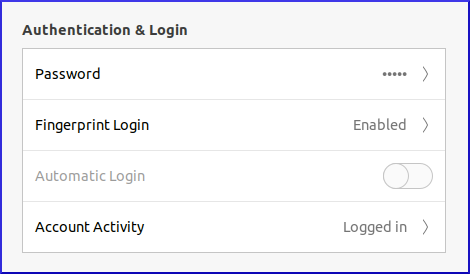
I have been waiting for this and I found the solution on the web by chance today. The guide I found was actually for Inspiron 5490/Vostro 5590, but it seems to have the same fingerprint hardware with 5480. In case you are impatient, go straight to Ubuntu – How to use 27c6:538d Goodix FingerPrint (Dell Inspiron 5490) (Dell Vostro 5590) Please make sure that the fingerprint ID (27c6:538c)is the same:  Bus 001 Device 002: ID 27c6:538c Shenzhen Goodix Technology Co.,Ltd. Fingerprint Reader The steps written in the guide above is enough. The only thing you have to do afterwards is to enroll the fingerprint. Go to Settings > Users > Fingerprint Login. It would open a window to register the fingerprints. After that you only need to logout and login again. Issue The fingerprint doesn't unlock the keyring, so as soon as you login and open Chrome for the first time you'd be asked to authenticate. That's all folks. Update (9 Nov 2020): The fingerprint reader is not always reliab...

Solve the Flutter Outline shows "Nothing to show" in Android Studio

Image
  Solution: Click on the red recycle icon of the Dart Analysis windows Have you wondered why the Flutter Outline doesn't show anything? I googled it and found many answers. Strangely the accepted answer on stackoverflow.com, which has got 144 helpful votes, doesn't actually solve the issue, especially in my case. Therefore I wrote about it here to help other people. As you can see in that link above, there are 9 answers to that particular questions. In my case, only two actually work i.e. clicking on red recycle icon in the Dart Analysis window.  Here we are folks. As a programmer you wasted a lot of time googling and try any solution written, which most of the time don't work. Only after trying many things you may hit the correct one! Cheers!

Solve flutter doctor android licenses error

Image
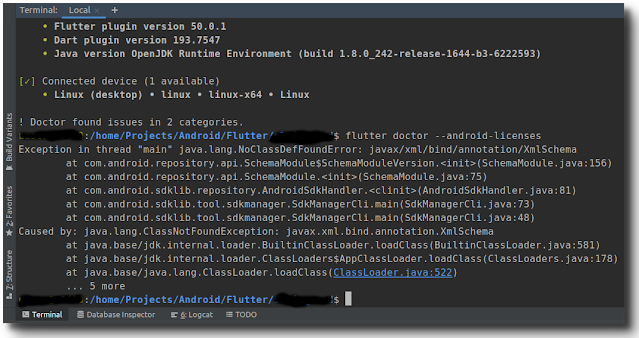
error: flutter doctor --android-licenses Life as a programmer seems sometimes like a pain (luckily a true programmer loves such a life :). You could spend hours only to fix a small error. That happened to me recently. Suddenly flutter doctor threw error of android licenses (see the screenshot above). I spent hours browsing for solution on the web (esp. stockoverflow.com). Unfortunately some accepted solutions there didn't really solve the problem I had. Therefore I feel the need to document it here to help other users who happen to face the same issues. In short: simple "export JAVA_OPTS='-XX:+IgnoreUnrecognizedVMOptions --add-modules java.se.ee'" as some have suggested doesn't work! These are the steps that solve the issue (not inside the Android Studio terminal, because Android studio has its own jdk version): 1. Install openjdk8: sudo apt install openjdk-8-jdk 2. Select java8 as default: sudo update-alternatives --config java and select jdk8. 3. make sure ...

For the first time I pre-ordered a phone without reading any review. Why?

Image
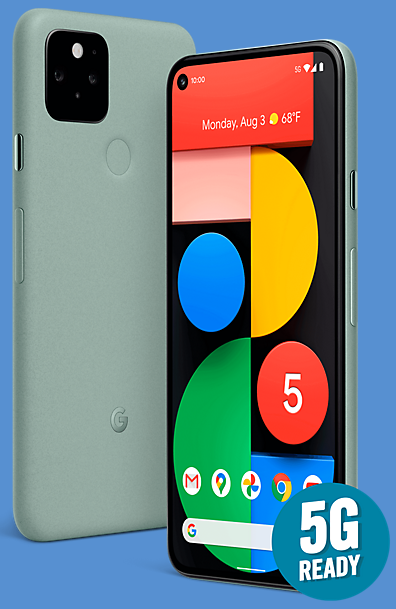
  I have done what I normally not do: pre-ordered Google Pixel 5, without reading a review. Why? Google is to blame. For years I had always chased the flagship phones, like Samsung Galaxy S or Galaxy Note series and later on OnePlus devices. I regularly changed phone after 8-10 months! One thing that wasted a lot of time was customising, because there was always something I didn't like and even bothered me. Until Google Pixel 2 entered the scene in October 2017! That phone spoilt me, the only thing I had to change was the wallpaper. Apart from that everything works smoothly and a lot of my friends asked me with which camera I took my photos. And it's still my primary device until now. By the end of last year I thought Pixel 2 needed an upgrade, not because it was not working well, but I just wanted to try a new flagship. At the time OnePlus 7T (OP7T) was claimed the best smartphone on various websites. The long-term review of gsmarena.com and of MKBHD influenced my decision.  ...

Got an invaluable treasure

Image
While browsing for a Nias dictionary, I stumbled upon the abebooks website. And indeed it listed the old dictionary I was looking for for puchase. And so I did just that. After the completed transaction I found out, that the seller is in Delhi, India, and it took 25 days for delivery. Hmmm.... Apart from the worst customer service I have ever had (and will make sure I will not purchase anything from them anymore, since they don't deserve my money with such terrible customer service) the dictionary arrived. To my surprise it is not the original print, but a newly printed version of the old book. As you can see at the left page of the photo above, the company is specialised in printing old books. I suppose this is legal, as the author and the print was over 100 years ago, so it should be now on public domain. Despite the turn and twist to Delhi, I have to admit that this is really an extraordinary treasure for Nias language. As far as I am aware of, this is the first proper dictionar...

New big projects ahead: Nias language projects

Image
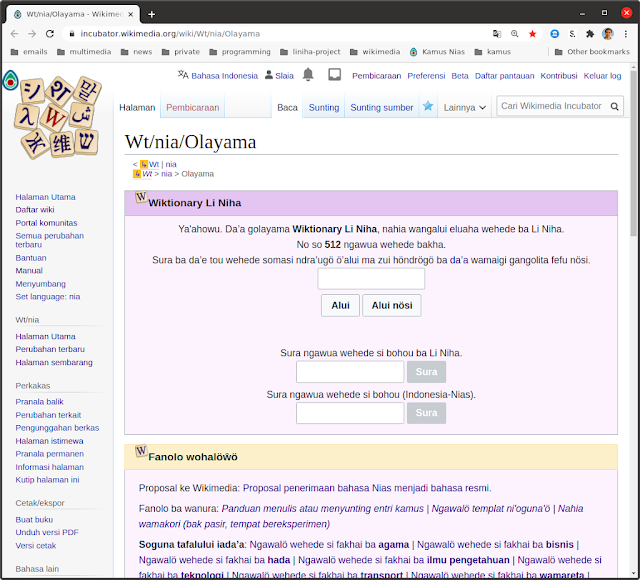
In the past three months a lot of things happened, but there will be a lot in the future. Last year I started the Nias Keyboard Project , a project to provide Nias typical characters, that are not available on normal keyboard (smartphones and PCs). That's done and the app has been available on Google Play for a few months. That led me to create a dictionary and a language extension for AnySoftKeyboard, the truly open-source Android keyboard project. While I was trying to figure out how to write a hunspell affix file for Nias language (would be needed for the automatic spelling check on the PC), I realised another step is needed: to set the standard of the language itself (or at least a reference I can work on).  And that led me to form a group of enthusiasts to discuss various topics on Nias language. The WA group finally agreed on a five year plan (2020-2025) to document, to set standards and to promote Nias language. In June I realised that it was a huge task to compile new wor...